

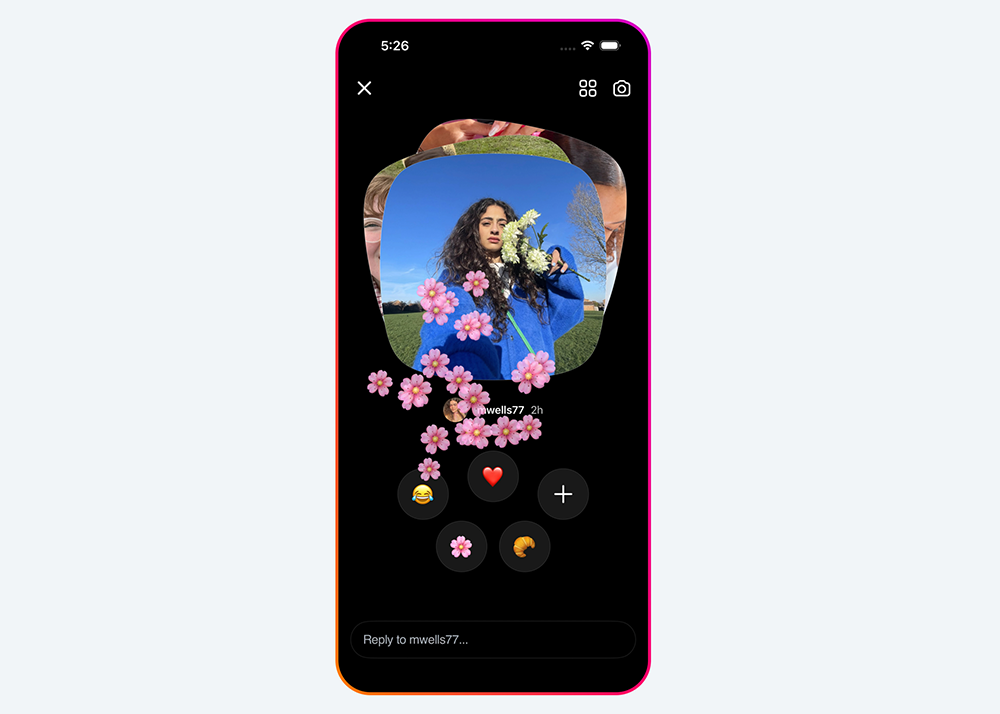
Instagram has introduced a new in-app feature called instants. A new way to share photos in the moment with your Close Friends or mutual followers with just a tap.
Photos shared on Instants disappear after they’ve been viewed and can’t be viewed after 24 hours. Users are unable to edit their pictures before sharing, so the content shared are authentic moments, as they are happening in real time.
This is your last chance to book tickets to the first-ever Campaign Breakfast Briefing: Retail & Commerce Media on Friday, 22 May. Get yours now for actionable strategy on enhancing ROI for retail and commerce media in the region.
Users can capture an instant by tapping the mini pile of photos at the bottom right corner of their Instagram inbox or by opening the Instants app. From there, snap a photo in real time – no uploads from phone’s photo gallery. Users can also add a caption to their photo but can’t make any further edits to it.
Next, users can choose who they want to share their content with. Recipients can react with emojis, reply, and send instants back to you. The instants users share will show up as a pile of photos in the inboxe section and will disappear once they’re viewed.
Features:
- Archive: The shared content is saved in a private archive that only users can see for up to one year, which users can access on the top right corner of Instants.
- Recap to Stories: Compile instants from the archive section into a recap and post it to Instagram Stories for users followers.
- No screenshots: Friends can’t screenshot or record content shared.
- Undo: Accidentally sent an instant? Quickly take it back before friends see it by tapping the undo button. Users can also delete an instant from their archive to unsend it to friends who haven’t opened it yet.
- Snooze: Hold down the pile of instants in users inbox and swipe right to temporarily stop receiving them. Bring back instants by holding down the same spot and swiping left.
All of the safety and privacy protections on Instagram apply to Instants including instagram’s in-app controls like Block, Mute, and Restrict. For teens, it is automatically integrated with Teen Accounts and Family Center. There is no separate setup – if a parent already supervises their teen on Instagram, that supervision automatically extends to the new feature.